Every content page on this site used to open with the same thing, a collapsible Table of Contents box sitting above the actual content. It worked, but it pushed the content down, it took a click to be useful, and it did nothing once you had scrolled past it. The margins on either side of the content column were sitting empty the whole time.
So I moved navigation into those margins and gave each page a control set that matches what the page actually holds.
Mobile navigation does not exist with these new features. Through a mobile device, this is a direct read for each section.
Blog Redone
The blog page already had archive navigation pinned to the left margin, grouped by year and month. The right margin was still empty, so that is where the tag filter went.
The tag list is built from the posts themselves at build time, so nothing is hand maintained. Each tag shows a count of how many posts carry it. Tags are sorted by count, most used first, and only the top ten render, with a toggle to expand the rest. The list sits in its own scroll box capped at 60vh so a long tag list cannot blow past the viewport and break the sticky column.
Selection is multi select and compounding. Checking a tag narrows the posts to the ones carrying it, checking a second narrows to posts carrying both. Empty month and year headings collapse as their posts disappear, so you never end up staring at a bare “June” with nothing under it.
The part I like most is the cascade. Once a tag is selected, every tag that shares no posts with it gets dropped from the list entirely, and the top ten window refills from whatever survives. Each selection leaves you with a smaller, still valid set of choices instead of a wall of tags that would return nothing.
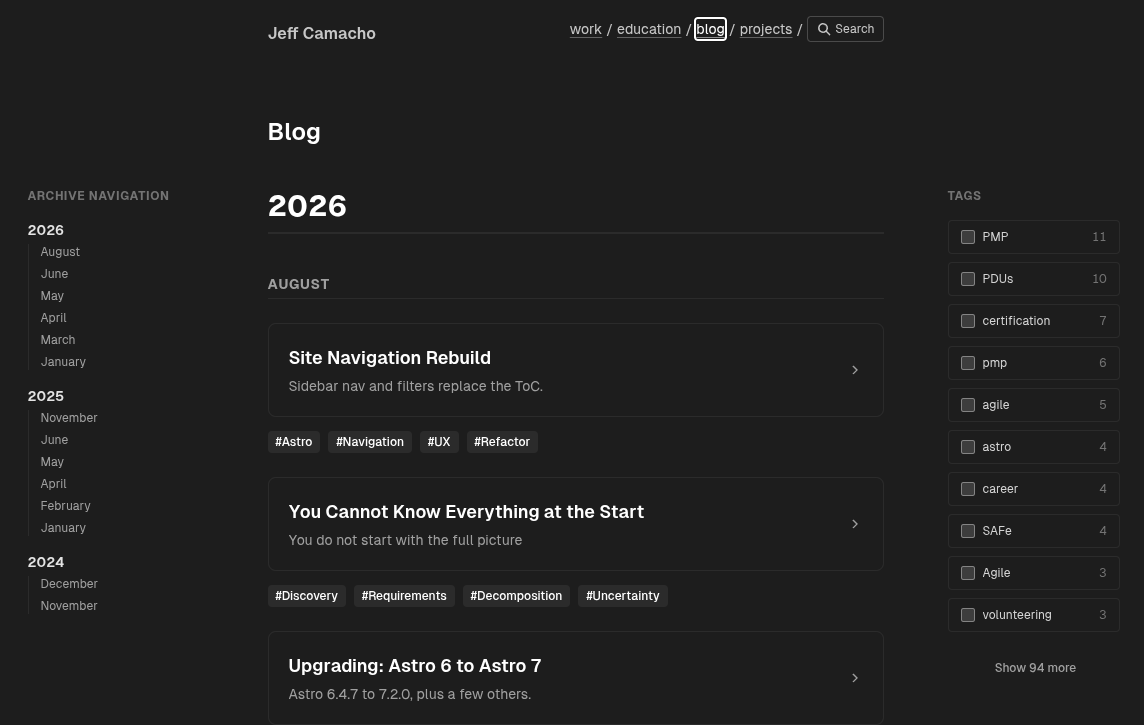 Blog tag filter
Projects Redone
Projects are grouped by status: Doing, To Do, Done, Backlog, and OBE. Same idea as the blog, checkboxes in the right margin with counts.
One difference in the logic. A project has exactly one status, so compounding filters would return nothing the moment you checked two boxes. The status filters are inclusive instead. Check Doing and Done and you get both sections. Statuses with zero projects are left out of the filter list, since a checkbox that can only ever produce a blank page is not a control, it is a trap.
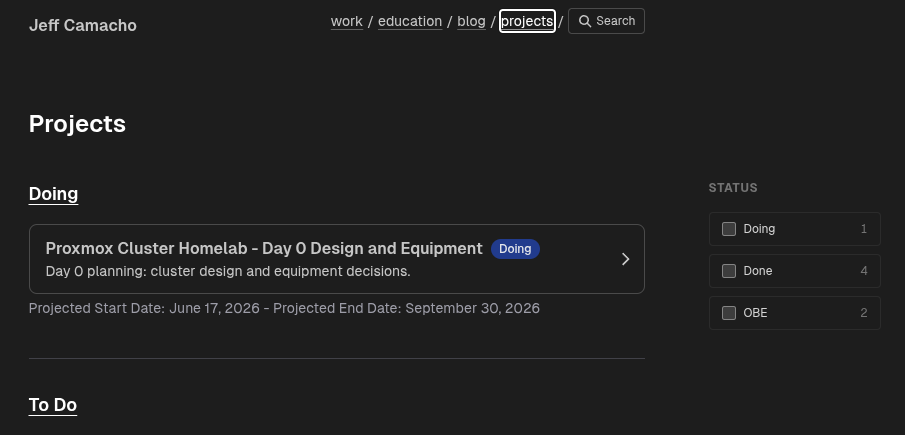 Projects status filter
Education Redone
Education has three fixed sections, Education, Certifications, and Certificates, and there is nothing meaningful to filter here. This page just needed the jump links out of the way, so it gets a left sidebar with the section list and a count next to each one. Sections with no entries do not appear in the nav.
 Education section nav
Work Redone
Work follows the same pattern with Work Experience, Entrepreneurial Experience, and Volunteer Experience. Sticky left nav, counts, no filters.
 Work section nav
Day After edits
After I committed the changes and verified the Netlify build, I pulled up the live site and realized I had missed a page: the blog post itself. Every index page had its sidebar, but individual posts still opened with the collapsible Table of Contents box.
The fix follows the same pattern as everywhere else. The post outline moves into the left margin as jump links, built from the h2 and h3 headings in the post, with h3 subheadings nested under their parent section. The Table of Contents box is gone.
Two behaviors here that the other pages do not have. The current section highlights as you scroll, tracking the last heading that has passed the header line. And clicking a link pins that link as active until you scroll on your own, which keeps a late loading image from shifting the highlight onto the section above.
One thing to note: I have not built a proper scroll to top control yet. There is a native one in the theme that renders inline at the end of each post, and it works, but it is not fixed or sticky, so you have to reach the bottom to use it. In the meantime the Top entry at the head of the outline points at #top, an id I put on the Back to blog wrapper, which takes the reader back to the top of the article from wherever they are.
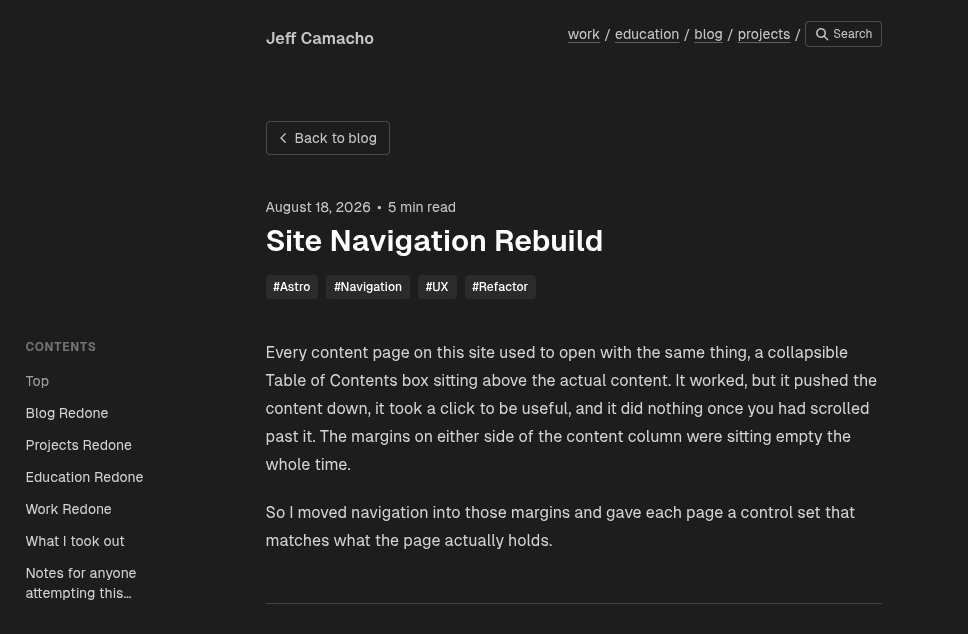 Blog sidebar nav
What I took out
The header had a hover dropdown under the blog link whose only child was a link to the tags page. With tag filtering living on the blog page itself, the dropdown was a second, worse way to do the same job, so it and the script driving it are gone. The /tags route stays, because the tag pills under each post still point at it.
The Table of Contents block is gone from all four pages, along with the imports and the divider stack that padded it out.
Notes for anyone attempting this…
The sidebars are absolutely positioned into the margin at lg and up, and hidden below that. On narrow screens you get the plain stacked page, which is the right answer on a phone anyway.
All filtering is plain DOM class toggling on server rendered markup. No client framework, no hydration, no fetch. Posts carry their tags in a data-post-tags attribute and the script hides what does not match. It also listens for astro:page-load so it survives view transitions.
Counts, tag lists, and section lists are all derived from the collections at build time. Publish a post with a new tag and the filter picks it up on the next build with no edits anywhere.
- Jeff